As a developer or UI/UX designer working with custom UI frameworks, you’re intimately familiar with the unique challenges they present. While offering unparalleled control and branding opportunities, maintaining and triaging issues within a bespoke component library can often feel like navigating a labyrinth. Subtle visual regressions, obscure interaction bugs, or performance hiccups can quickly consume valuable time, pulling focus away from feature development.
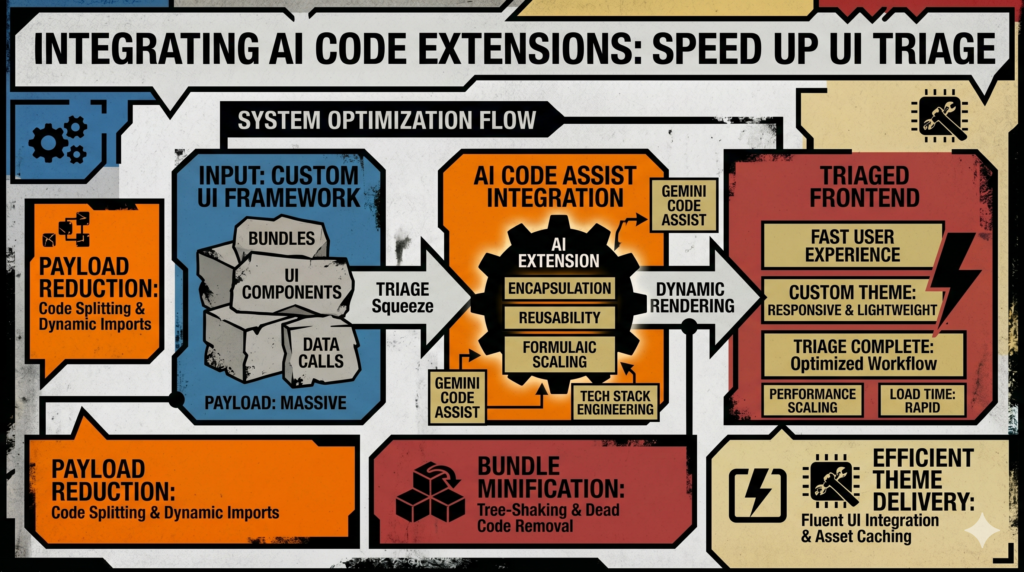
This is where AI code extensions are becoming an invaluable ally. They aren’t a magic bullet that writes your code for you, but rather intelligent assistants that augment your existing workflow, dramatically accelerating the investigative phase of bug triage in complex UI ecosystems.

The Inherent Complexity of Custom UI Frameworks
Building a custom UI framework from the ground up is a significant undertaking. Unlike off-the-shelf component libraries, your framework is tailored to your product’s specific needs, design language, and technical stack. This brings numerous advantages, but also unique pain points when things go wrong:
- Deep Context Required: Understanding how a component renders, manages state, handles props, and interacts with global styles often demands deep knowledge of the entire codebase and its underlying architecture.
- Interdependencies: A change in a base utility, a style token, or a core component can have ripple effects across the entire application, making root cause analysis difficult.
- Visual Nuances: Many bugs in UI frameworks are visual – a pixel misaligned, an animation glitch, or an accessibility issue that only manifests in specific viewport sizes or browser environments. Diagnosing these requires a keen eye and often extensive debugging tool usage.
- Slow Triage Cycle: The process of receiving a bug report, reproducing it, identifying the responsible component, tracing its dependencies, and finally pinpointing the exact line of problematic code can be incredibly time-consuming.
Leveraging AI Code Extensions for Smarter Triage
AI code extensions, like GitHub Copilot, Cursor, or similar integrations within IDEs such as VS Code, are powered by large language models (LLMs) trained on vast repositories of code. Their strength lies not just in code generation, but in their ability to understand context, explain complex logic, and suggest relevant modifications. For custom UI framework triage, this translates to several powerful capabilities:
- Rapid Code Understanding: Instead of manually tracing function calls or dissecting component lifecycles, an AI assistant can quickly summarize what a complex component does, how it receives data, and what its intended output should be.
- Issue Localization Suggestions: Based on a bug report (e.g., “The modal’s close button is not visible on smaller screens”), the AI can suggest relevant files, components, or even specific CSS properties that are likely candidates for the issue.
- Pattern Recognition: The AI can identify common anti-patterns or inconsistencies within your custom framework, such as misapplied design tokens, incorrect prop usage, or deviations from established component structures.
- Automated Test Generation: Once a potential fix is identified, the AI can assist in generating a minimal unit or integration test case, ensuring the fix works as expected and preventing future regressions.
- Refactoring Recommendations: Beyond immediate fixes, the AI can often suggest refactoring opportunities to improve component clarity, performance, or adherence to design system principles, making future triage even easier.
Practical Integration and Workflow
Integrating these tools into your daily triage routine is straightforward. Most modern IDEs, particularly VS Code, have robust extension ecosystems.
- Tool Selection: Start with a popular, well-supported extension like GitHub Copilot or explore standalone IDEs like Cursor that deeply integrate AI capabilities.
- Setup and Configuration: Install the extension, authenticate if necessary, and ensure it has access to your project’s codebase. Some tools allow you to point them to documentation or design system guidelines, enhancing their contextual understanding.
- The Triage Workflow:
- Bug Report Received: A designer reports that “the primary button’s hover state has incorrect padding on the product detail page.”
- Initial Investigation with AI: Open the relevant component file (e.g.,
PrimaryButton.jsx) and the page where the issue occurs (e.g.,ProductDetailPage.tsx). Ask the AI, “Explain how PrimaryButton styling is applied and overridden here.” or “Find all instances wherePrimaryButtonstyles might be affected byProductDetailPageCSS.” - Pinpointing the Issue: The AI might highlight a specific CSS block in a global stylesheet or a prop passed from the page component that’s unintentionally altering the button’s padding.
- Solution Brainstorming: Ask the AI, “How can I ensure the primary button always maintains its specified hover padding, even on pages with custom styles?” It might suggest using CSS cascade layers, more specific selectors, or refactoring the button’s style encapsulation.
- Verification & Test Generation: Once you’ve implemented a fix, prompt the AI: “Generate a unit test for
PrimaryButtonthat specifically checks for correct hover padding.”
Real-World Scenarios and Benefits
Consider these common challenges faced by UI/UX and development teams, and how AI assistance makes a difference:
- Visual Regressions: A new global CSS update inadvertently changes the border-radius of all cards. The AI can swiftly scan SCSS files, identify recent changes, and suggest which selector is overly broad, helping you revert or refactor.
- Component State Anomalies: A modal refuses to close under certain conditions. The AI can analyze the modal’s state management logic, prop updates, and event handlers to suggest where the state might be getting stuck or mismanaged.
- Accessibility Audit Issues: A screen reader issue arises due to missing ARIA attributes. The AI can review a component’s JSX/TSX and recommend appropriate ARIA roles and properties for better semantics.
- Performance Bottlenecks: A component causes excessive re-renders. The AI can analyze its dependencies, state updates, and prop changes to pinpoint potential areas for memoization or more efficient data handling.
- Bridging Design & Code: A designer identifies a deviation from the design system. The AI can help developers quickly understand the design token associated with a specific CSS variable or component prop, and identify where it’s being incorrectly applied.
For UI/UX designers, this means quicker feedback loops, as developers can diagnose and fix issues faster, bringing the visual reality closer to the design intent without extensive back-and-forth. For developers, it means less time spent on tedious investigations and more time building new features or improving the framework itself.
A Balanced Perspective: Benefits and Caveats
While AI code extensions offer a compelling advantage, it’s crucial to approach them with a clear understanding of their strengths and limitations.
- Benefits:
- Speed: Significantly reduces time spent on investigation and context switching.
- Efficiency: Accelerates root cause analysis and solution identification.
- Knowledge Transfer: Helps junior developers quickly grasp complex parts of the codebase.
- Consistency: Can highlight deviations from established coding standards and design system principles.
- Reduced Cognitive Load: Frees up mental bandwidth for more complex problem-solving.
- Caveats:
- “Hallucinations”: AI can sometimes generate plausible but incorrect or non-optimal code/suggestions. Human oversight is always essential.
- Context Limitations: While improving, AI might still struggle with highly abstract problems or truly novel architectural patterns not present in its training data.
- Proprietary Code Concerns: Depending on the tool and your organization’s policies, there might be concerns about sending proprietary code to third-party AI services. Ensure you understand and comply with your company’s data privacy guidelines.
- Over-reliance: It’s important not to become overly dependent, ensuring developers still understand the underlying code and reasoning.
Wrapping Up
The integration of AI code extensions into the custom UI framework triage process isn’t about replacing human developers or designers. Instead, it’s about empowering us with intelligent tools that amplify our capabilities, allowing us to spend less time digging and more time innovating. By embracing these assistants, we can significantly reduce the friction inherent in maintaining bespoke component libraries, leading to faster iterations, higher quality products, and a more focused and productive team. Dive in, experiment, and discover how these tools can transform your workflow.