As front-end development matures, we’re presented with an ever-growing array of choices for styling our applications. Among the most discussed are the platform’s native capabilities—Vanilla CSS Custom Properties—and the increasingly popular utility-first framework, Tailwind CSS. Both offer powerful ways to manage styles, but their underlying philosophies and architectural implications couldn’t be more different. For UI/UX designers mapping out design systems and web developers implementing them, understanding these trade-offs is crucial for making informed decisions that impact long-term project health.

Vanilla CSS Custom Properties: Embracing the Cascade
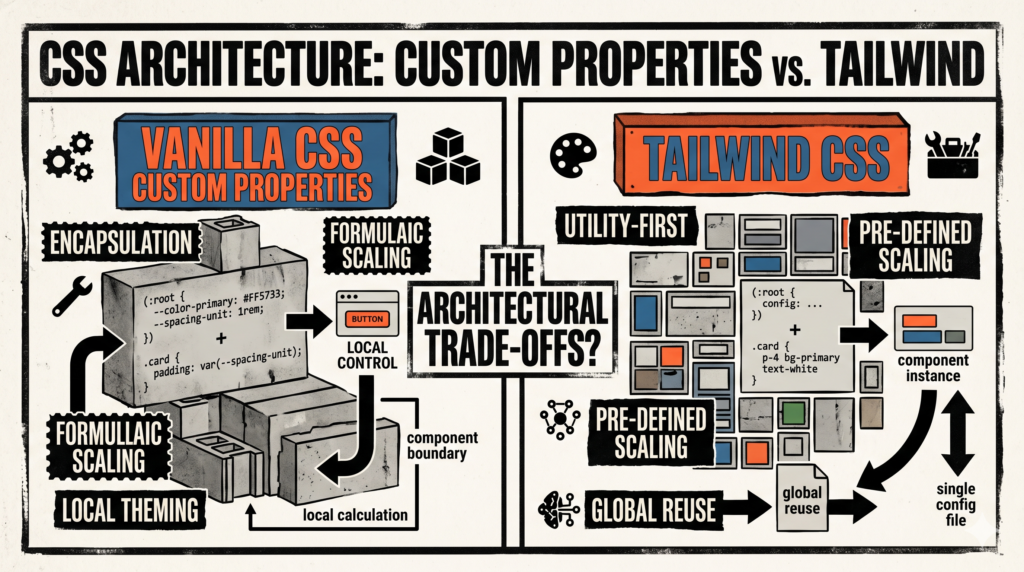
CSS Custom Properties, often called CSS variables, are a native feature of CSS that allows you to define reusable values throughout your stylesheets. They’re prefixed with `–` (e.g., `–primary-color: #ff6210;`) and are scoped to the element they’re declared on, inheriting down the cascade. This native behavior is their greatest strength and their most significant architectural differentiator.
- Declarative Theming: You can define a suite of variables for colors, fonts, spacing, and more, all within your CSS. This makes creating theme toggles (dark mode, anyone?) remarkably straightforward by simply changing a few root-level custom property values.
- Cascading Power: Custom properties participate fully in the cascade. A variable declared on
:rootis globally available, but one declared on a specific component can override or extend that value for its descendants, enabling highly granular, context-aware styling. - Developer Control: You have direct control over the entire styling layer. There’s no abstraction, just raw, powerful CSS. This means deeper understanding of browser rendering and less reliance on third-party tooling for basic styling.
- No Build Step (for basic usage): At its core, Vanilla CSS with custom properties doesn’t inherently require a build step beyond what you might already have for bundling. Your browser understands them natively.
Tailwind CSS: The Utility-First Paradigm
Tailwind CSS is a utility-first CSS framework. Instead of writing CSS directly, you apply pre-defined utility classes directly in your HTML. These classes are single-purpose (e.g., text-xl for font-size: 1.25rem; or p-4 for padding: 1rem;). Tailwind aims to eliminate the need for writing custom CSS in most scenarios by providing a comprehensive, configurable set of atomic classes.
- Atomic Design by Default: Tailwind naturally encourages an atomic approach to design. Components are built from smaller, reusable utility classes, making it easier to maintain consistency across a design system.
- Rapid Development: By staying in your HTML and not context-switching to a separate CSS file, development speed can significantly increase. Designers and developers can speak the same language of utility classes.
- Small Bundle Sizes: Tailwind’s JIT (Just-In-Time) compiler, or PostCSS processing, scans your code for used utility classes and generates only the necessary CSS, leading to incredibly small production CSS files.
- Opinionated but Configurable: While it comes with sensible defaults, Tailwind is highly configurable via a JavaScript config file, allowing you to extend or override its default design tokens (colors, spacing, etc.) to match your design system precisely.
Architectural Trade-Offs: A Deeper Dive
Design System Integration & Theming
Vanilla CSS Custom Properties: This is where custom properties shine for design systems. You define your design tokens (color palette, typography scales, spacing units) once as variables, typically at the :root level. Components then reference these variables. Theming, like dark mode, becomes a matter of swapping a few root-level variable values. It’s incredibly flexible and empowers designers to manage the core aesthetic with minimal developer intervention once the initial structure is in place.
Tailwind CSS: Tailwind also excels at design system integration, but through a different mechanism. Your design tokens are defined in the tailwind.config.js file. Tailwind then generates utility classes based on these tokens (e.g., bg-primary, text-h1). Theming with Tailwind often involves dynamically changing class names (e.g., adding a dark: prefix or using CSS Custom Properties *within* Tailwind’s config) or creating specific theme classes that apply a set of utilities. It’s powerful, but can feel less “native” for deep, multi-level theme switching compared to the cascade of custom properties.
Maintainability & Refactoring
Vanilla CSS Custom Properties: Changes to global styles (e.g., updating a brand color) are trivial: change one variable definition, and it propagates everywhere. However, if a component’s specific styling needs to change, you might be digging through various CSS files or selector specificities. This can lead to a more fragmented mental model of styling, especially in larger projects with many contributors.
Tailwind CSS: Refactoring with Tailwind is often component-centric. If you need to change a component’s look, you primarily edit its HTML directly. This colocation of styles with markup can make it easier to reason about a component’s appearance. The downside is that changing a shared style pattern across multiple components requires a find-and-replace operation or extracting that pattern into a reusable component (e.g., using a UI framework like React or Vue) or a Tailwind @apply directive (which can be an anti-pattern if overused). It shifts the maintenance burden from CSS files to HTML templates.
Scalability & Code Organization
Vanilla CSS Custom Properties: For large projects, managing a pure CSS codebase with custom properties requires strong organizational principles (like ITCSS or BEM) to prevent specificity wars and maintain order. While custom properties simplify token management, the overall structure still relies on thoughtful CSS architecture. Scalability often means more CSS files, potentially leading to more complex build processes to concatenate and minify.
Tailwind CSS: Tailwind promotes a flatter, utility-first structure. Your CSS remains lean because most styling lives in your HTML. Scaling means more HTML files with utility classes. This can be a boon for team collaboration, as developers are less likely to clash over CSS naming conventions or specificities. The trade-off is often “template bloat,” where long strings of utility classes can make HTML harder to read, though this is mitigated by component frameworks.
Performance Considerations
Vanilla CSS Custom Properties: The performance impact is minimal. The browser parses and computes variables as part of the normal CSS rendering process. The total CSS file size can grow large in extensive projects without careful optimization, potentially impacting initial load times.
Tailwind CSS: This is one of Tailwind’s strongest suits. With its JIT engine or PostCSS compilation, it generates only the CSS you actually use. This often results in minuscule production CSS files, leading to faster initial page loads and better Lighthouse scores. The processing happens at build time, so there’s no runtime overhead from Tailwind itself.
Developer Experience & Learning Curve
Vanilla CSS Custom Properties: For developers already proficient in CSS, adopting custom properties is a natural extension. The learning curve is minimal. However, maintaining large CSS codebases can be challenging, requiring deep CSS knowledge and experience to debug specificity issues or complex cascades. For designers, integrating directly into CSS can sometimes feel abstract without visual tooling.
Tailwind CSS: There’s a learning curve to grasp Tailwind’s utility class names and its configuration, but once familiar, developers often report significant productivity gains. The “constraint-based” nature (e.g., text-sm, text-lg instead of arbitrary pixel values) helps reinforce design system adherence. For designers, the explicit naming of utility classes can bridge the gap between design tokens and their application in code more directly, provided they learn the utility syntax.
Making the Choice: It Depends
Neither approach is objectively “better” than the other; they simply serve different architectural philosophies and project needs. The choice hinges on your team’s existing skill set, project scale, design system complexity, and desired development workflow.
- Choose Vanilla CSS Custom Properties if:
- You prefer a native CSS approach and want full control over the cascade.
- Your project requires extremely dynamic and context-sensitive theming, leveraging the cascade directly.
- Your team has strong CSS architectural experience and prefers writing custom CSS.
- You want to avoid introducing another build tool or abstraction layer beyond what’s strictly necessary.
- Choose Tailwind CSS if:
- You value rapid development and staying within HTML for styling.
- Your team works with a component-based architecture (e.g., React, Vue, Svelte).
- You prioritize small CSS bundle sizes and performance.
- You want a highly configurable framework that enforces design system constraints with clear, atomic utility classes.
- You’re comfortable with a utility-first paradigm and its associated learning curve.
Conclusion
The beauty of modern web development is the diversity of tools at our disposal. Vanilla CSS Custom Properties empower us to leverage the very foundation of the web with unprecedented flexibility for theming and architectural control. Tailwind, on the other hand, offers an opinionated, highly efficient, and incredibly productive workflow that shifts the styling paradigm closer to the markup. As a developer or designer, understanding these architectural trade-offs is paramount. Evaluate your project’s unique demands, your team’s strengths, and the long-term vision for your product before committing. Often, a hybrid approach leveraging Tailwind’s utilities alongside a few strategic custom properties for deep theming might even be the sweet spot for many.